Reminders & focus
Choose what gets a nudge, what gets a timer, and when your crew should give you some room.
Set your water rhythm
Open Reminders, turn on Water reminders and change Say hello every. The interval restarts after you log a drink. Set My glass to the amount you normally log and choose your own personal goal.
Choose Yes, I drank only when you want to log a drink. The menu bar’s I drank a glass offers a quick manual log; its undo action can correct an accidental entry. The app does not measure what you drink.
Eye rest and movement are separate
In Focus & breaks, turn on Eye-rest reminders or Movement breaks. Each has its own interval and duration. Use 20–20–20 preset sets eye rest to 20 seconds every 20 minutes.
When a break arrives, choose Start break to begin its timer, Later to postpone or Skip to dismiss it. You do not have to watch the countdown. A timer cannot verify where you look or whether you moved; break history is separate from water totals.
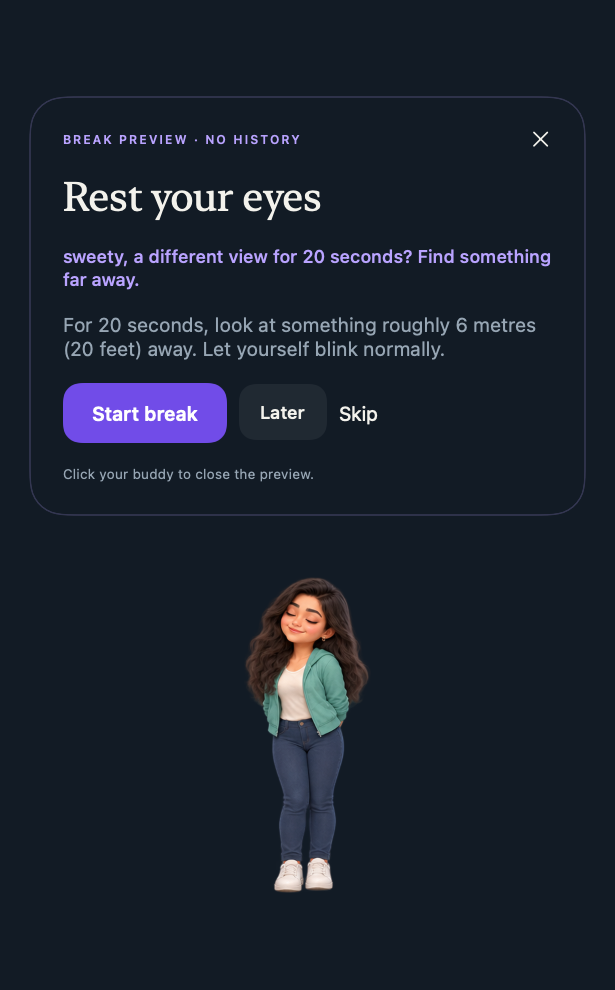
Dismiss a buddy quickly
Click the character to hide the reminder and snooze it: 10 minutes for water or 5 minutes for a break. Nothing is logged. Clicking a character in a preview just closes that preview.
Focus, meeting protection and quiet hours
- Start Focus in Focus & breaks silences this app’s reminders, characters and sounds. It does not change other apps’ notification settings.
- Protect session gives a meeting or presentation explicit quiet time. Use this when avoiding interruptions matters.
- Quiet hours in Reminders sets your regular daily quiet window.
- The menu bar also offers a temporary pause. Resume when you are ready.
Optional safeguards
Settings can delay reminders during active input, pause when a microphone is in use or a display is mirrored, or pause while a chosen app is in front. These are system signals with limits: dictation can resemble a call, and display mirroring does not detect every screen share. Explicit Focus or meeting protection is more predictable.
Pause reminders when I’m away uses elapsed keyboard or pointer idle time. Quiet reading can look like absence, so enable it only if it suits your work.
When you use your Mac for only part of the day
Reminders run only while the app is running and the Mac is awake and unlocked. Relaunch and return from sleep start fresh intervals, without catching up on missed reminders. Your personal daily goal counts logged drinks and remains yours, whether the Mac is on for 3 hours or 8.