aira.Croppy DocsAira waves helloA LITTLE SOMETHING IS COMING

Croppy is getting ready.

The Figma Community link is coming soon. Explore what Croppy can do while Aira gets everything ready.

USING CROPPY

Pick sizes

Choose the output sizes in the left sidebar. Croppy makes one image for every selected source in every selected size.

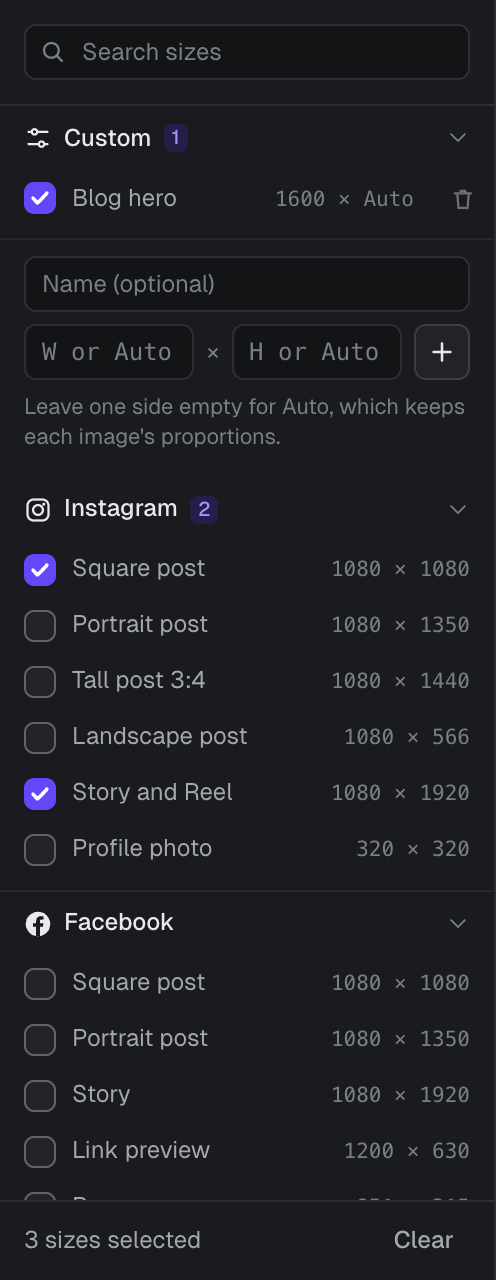
The size sidebar

The size sidebar with a custom Blog hero size of 1600 by Auto, and Instagram Square post and Story and Reel ticked.
A custom size with an Auto height, and two Instagram presets ticked.
  • Tick a size to add it. Tick it again to remove it.
  • Click a group name to fold it away. The number next to a group shows how many of its sizes are ticked.
  • Search sizes finds sizes by group, name or dimensions, such as story or 1080x1920.
  • The bottom of the sidebar shows how many sizes are selected. Clear unticks them all.

For example, 4 sources and 3 sizes make 12 images. The aspect ratio of each size decides the shape of its crop.

Add a custom size

  1. Open the Custom group at the top of the sidebar.
  2. Type a name, or leave it empty to name the size after its dimensions.
  3. Enter a width and height in pixels, from 1 to 8192. Leave one side empty, or type Auto, to keep each image's proportions.
  4. Click +. The new size is added and ticked.

Auto works out the missing side from each source. A 1600 × Auto size makes a 1400 × 1000 image into 1600 × 1143, and a 900 × 1200 image into 1600 × 2133. Only one side can be Auto. To delete a custom size, click the bin icon next to it.

Preset sizes

Croppy includes 61 sizes in 12 groups, based on each platform's published guidance as of October 2026. Print sizes are at 300 DPI. Platforms change their specs from time to time, so check their latest guidance for important work.
Instagram

SizeWidth × height (px)
Square post1080 × 1080
Portrait post1080 × 1350
Tall post 3:41080 × 1440
Landscape post1080 × 566
Story and Reel1080 × 1920
Profile photo320 × 320

Facebook

SizeWidth × height (px)
Square post1080 × 1080
Portrait post1080 × 1350
Story1080 × 1920
Link preview1200 × 630
Page cover851 × 315
Profile photo320 × 320

LinkedIn

SizeWidth × height (px)
Landscape post1200 × 627
Square post1080 × 1080
Portrait post1080 × 1350
Profile banner1584 × 396
Page cover1512 × 256
Page logo400 × 400
Profile photo400 × 400

X

SizeWidth × height (px)
Landscape post1200 × 675
Square post1080 × 1080
Header1500 × 500
Profile photo400 × 400

YouTube

SizeWidth × height (px)
Thumbnail1280 × 720
Shorts1080 × 1920
Channel banner2560 × 1440
Profile picture800 × 800

TikTok

SizeWidth × height (px)
Vertical post1080 × 1920

Pinterest

SizeWidth × height (px)
Standard pin1000 × 1500
Square pin1000 × 1000
Long pin1000 × 2100

Display Ads

SizeWidth × height (px)
Medium rectangle300 × 250
Large rectangle336 × 280
Leaderboard728 × 90
Large leaderboard970 × 90
Billboard970 × 250
Half page300 × 600
Wide skyscraper160 × 600
Square250 × 250
Mobile banner320 × 50
Large mobile banner320 × 100

App Stores

SizeWidth × height (px)
iPhone 6.9 screenshot1320 × 2868
iPad 13 screenshot2064 × 2752
App Store icon1024 × 1024
Play phone screenshot1080 × 1920
Play feature graphic1024 × 500
Play icon512 × 512

Web

SizeWidth × height (px)
Link preview1200 × 630
Email header1200 × 400
Web app icon512 × 512
Apple touch icon180 × 180

Video

SizeWidth × height (px)
4K UHD3840 × 2160
Full HD1920 × 1080
HD1280 × 720
Vertical Full HD1080 × 1920

Print

SizeWidth × height (px)
A51748 × 2480
A42480 × 3508
A33508 × 4961
US Letter2550 × 3300
Postcard 4x6 in1200 × 1800
Business card1050 × 600